显示标签为“Digiprog 3”的博文。显示所有博文

2020年10月20日星期二

SKODA OCTAVIA Mileage Correction With Yanhua Digiprog 3

Hello, guys. this is a  instruction here for you all on how to correct or change the mileage of SKODA OCTAVIA 2001 by using Digiprog 3 odometer programmer,only in 3 minutes! Check the below steps to know how simple it is!

Step1. Connect Digiprog iii with OCTAVIA via OBD2-port. Power up Digiprog iii and you see notice information, Press " √" to continue. Then enter password to open the main menu.


SKODA OCTAVIA  Mileage Correction With Yanhua Digiprog 3  1


Turn car ignition on, The indicator light on dashboard will flash. Check the parameter (km) on the dashboard.the old odometer value is 118058.

SKODA OCTAVIA  Mileage Correction With Yanhua Digiprog 3  2SKODA OCTAVIA  Mileage Correction With Yanhua Digiprog 3 3

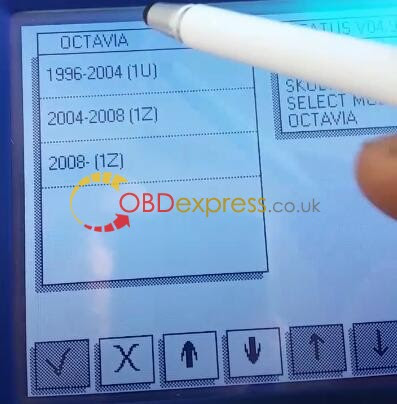
Step2.Select -->CAR/TRUCK-->SKODA-->OCTAVIA-->1996-2004(1U)-->DIAG

SKODA OCTAVIA  Mileage Correction With Yanhua Digiprog 3  4

  SKODA OCTAVIA  Mileage Correction With Yanhua Digiprog 3  4

SKODA OCTAVIA  Mileage Correction With Yanhua Digiprog 3 5
SKODA OCTAVIA  Mileage Correction With Yanhua Digiprog 3 6


SKODA OCTAVIA  Mileage Correction With Yanhua Digiprog 3 7

Step 3. Press " √"  then it will  test automatically

SKODA OCTAVIA  Mileage Correction With Yanhua Digiprog 3  9

Step 4. Enter new odometer value as you like

SKODA OCTAVIA  Mileage Correction With Yanhua Digiprog 3  10

ChangeSKODA OCTAVIA 2001 mileage successfully by Digiprog 3 V4.94! Now new odometer value turns to 124272!

SKODA OCTAVIA  Mileage Correction With Yanhua Digiprog 3  12

SKODA OCTAVIA  Mileage Correction With Yanhua Digiprog 3  13

CusTomer FAQ:

Q : How can I Know where is my OBD2 port?

A: The On-Board Diagnostics II (OBD-II) port is used to access the vehicle's computer for various tasks, such as emissions tests and diagnostics.
The OBD-II port is where the Hum System is installed so that the network can communicate with the vehicle directly.
After activation, the vehicle owner receives an alert email if the OBD reader has been plugged back in after being unplugged from the port.
For additional assistance in locating your particular model vehicle's OBD port, consult the OBD locator.

The OBD-II port is usually located under the dashboard, beneath the steering wheel column (1 - 3 in the diagram below).
Note If not located beneath the steering column, look for the port in the areas indicated by numbers 4 - 9.

OBD-II port


In this cause,  the SKODA OCTAVIAOBD port is underneath the panel

SKODA OCTAVIA  Mileage Correction With Yanhua Digiprog 3  14

http://www.mileageprogrammer.com/skoda-octavia-km-change-with-digiprog-3-by-obdii/

2020年10月14日星期三

Suzuki Swift Mileage Correction Via Yanhua Digiprog 3

 Hi, guys,  I would like to share the guide of how to change Suzuki Swift mileage by Yanhua Digiprog 3 v4.94 here.

Vehicle: Suzuki Swift 24C16

Tool used: Yanhua Digiprog 3

Purpose: change mileage from 214208KM to 123200KM

Procedures:

The first, connect your car and dp3 mileage correction tool

Current mileage:214208KM

SUZUKI SWIFT Digiprog 3 odometer correction 1
 

-->CAR/TRUCK-->SUZUKU-->SWIFT-->24C16

SUZUKI SWIFT Digiprog 3 odometer correction  2

SUZUKI SWIFT Digiprog 3 odometer correction  3 

 SUZUKI SWIFT Digiprog 3 odometer correction  4

SUZUKI SWIFT Digiprog 3 odometer correction  5

Press "√" to continue
SUZUKI SWIFT Digiprog 3 odometer correction  6
 

SUZUKI SWIFT Digiprog3 6

Input the new KM what you want, then Press "√" ,Digiprog 3 will automatically rewrite the mileage to your car dash. Here, we input new km: 123225


SUZUKI SWIFT Digiprog 3 odometer correction  7

 SUZUKI SWIFT Digiprog 3 odometer correction  8

Works have done!Check written value

 SUZUKI SWIFT Digiprog 3 odometer correction  9


New Mileage: 123200KM

SUZUKI SWIFT Digiprog 3 odometer correction  10


Digiprog 3 mileage programmer change Suzuki Swift 24C16 kilometrage succeed!

BTW, Digiprog3 for SUZUKI vehicle list for you check:

Suzuki Alto
Suzuki Alto 2009
Suzuki Cycle Intruder
Suzuki GSR 750
Suzuki Gran Vitara
Suzuki Ignis
Suzuki Intruder
Suzuki Jimny
Suzuki King Quad 93C56
Suzuki Liana 2005
Suzuki Liana 2005 Program via chip
Suzuki SX4 Program via chip
Suzuki Splash C46 Program via chip
Suzuki Swift 2005
Suzuki Swift 24C16
Suzuki TL 1000S Program via chip
Suzuki Vitara Program via chip

  http://www.mileageprogrammer.com/

2020年10月1日星期四

How to fix DigiProg 3 Issue "NO CONNECTION"


Question: when I tried to use Digiprog 3 mileage programmer to correct mileage for an Audi A4 of the year 2000, a window popped up, saying “NO CONNECTION”. I have also tested it on another A4 of the year 2006, and the error message showed up again. What could be the problem? Is the tool broken? Below is a photo of the problem. Please help. Urgently. Thanks.

DigiProg 3 V4.94 "NO CONNECTION"


Answer:

According to the error message you provide, I guess you are connecting the tool via OBD2 port, right? However, according to the DP3  odometer correction tool manual book, to program mileage for most cars before 2008, you will have to disassemble the dashboard and get access to the mileage chip. Then you will need to use ST01, ST04, or other cables rather than OBD2 cable to clip the chip and let the chip communicate with the Digiprog iii odometer correction tool.

The Digiprog3  will tell you if you need to disassemble the dashboard, as well as which cable you should use to do mileage programming for the car.

Solution: You can disconnect the tool, connect it to your car again, and pay attention to system prompts to determine how to do the programming.

Hope this helps

2020年9月8日星期二

How to fix Digiprog iii on toyota MR2 MK3 "chip not found"

Topic:  Digiprog III  problem on a Toyota mr2 mk3 "chip not found"

Question 1: When I try to connect my c46 plug which the Digiprog 3  says I'm supposed to use to adjust the milage (the old one broke and I got a new one that has a lot higher mileage than the original odometer), I get the message "chip not found" error...does anybody know why?

Answer:

Two things:-

1. make sure you are putting your c46 cable on the right chip (93C46).
2. Make sure you're putting the cable on the right way round, the chip normally has a marking where PIN 1 is located, this should be connected to the cable with PIN 1 touching the PIN with the red wire on your cable.

Question 2: 

Tried to connect it the two ways it can be connected.. still nothing, this is btw the cable I got told to use.

102_Untitled-102-digiprog3


Answer:
Short the cristol and try it.

Result: 

It works now, i started looking more carefully on the adapter itself.. which had plastic residue on the clip so it wouldn`t grip the chip enough to make full contact!

Credit to nemesis988 and Fraz from cartechnology.co.uk, thanks!

Relate post:

Using Digiprog 3 V4.94 to program EEPROM Guide

2020年8月10日星期一

DigiProg3 Manual: Yamaha YZF R1 2001 Mileage Correction

Hello, guys. I made a small instruction here for you all on how to correct or change the mileage of Yamaha YZF R1 2001 93C46 EEPROM chip using Digiprog 3 odometer programmer

Disclaimer:
The guide is only for educational purposes and not by any means to be wrongly or criminally used for cheating or manipulating with cars mileage for sales purposes

Tool used:
Digiprog 3 v4.94+ ST01/ST04 Cable

Digiprog 3 v4.94+ ST01/ST04 Cable

Two parts of DigiProg3 Yamaha R1 2001 93C46 mileage correction:

Part 1:

Take apart the EEPROM chip Yamaha YZF-R1 93C46.

You can take a close look at as below:

 DigiProg3 Yamaha R1 2001 93C46 1DigiProg3 Yamaha R1 2001 93C46 2


In this case, you need the ST04 cable to connect 93C46 EEPROM chip with Digiprog iii.

DigiProg3 Yamaha R1 2001 93C46

Fit the chip with ST04 cable clip properly like this:

 DigiProg3 Yamaha R1 2001 93C46  3

DigiProg3 Yamaha R1 2001 93C46 4

Connect ST04 cable with Digiprog iii and connect device to power supply.

DigiProg3 Yamaha R1 2001 93C46  5

Part 2

The device will power on. You will see an information message, click OK.

DigiProg3 Yamaha R1 2001 93C46  6

Input your device password to enter the main menu.

Go to “MOTORCYCLE” section

DigiProg3 Yamaha R1 2001 93C46  7

Scroll down to select “YAMAHA”, “YZF R1” then “C46 (2001)”.

 DigiProg3 Yamaha R1 2001 93C46  8

DigiProg3 Yamaha R1 2001 93C46  9 DigiProg3 Yamaha R1 2001 93C46  10


It will show “93CS46 PLUG 1”, click OK to continue.

DigiProg3 Yamaha R1 2001 93C46  11

Step 3

You can see the old odometer value as 27584KM.

DigiProg3 Yamaha R1 2001 93C46  11

And just enter a new value like 40000KM, click OK and confirm it again.

DigiProg3 Yamaha R1 2001 93C46  13

Now you change Yamaha R1 mileage successfully using Digiprog iii 

DigiProg3 Yamaha R1 2001 93C46  14

Digiprog 3 V4.94 car list of YAMAHA:

YAMAHA
FAZER
MT03 24C04
TMAX 500 C46
WILD STAR C46
XV 1900 93CS66
YZF R1
C46 2001
C56 2002
L56R 2005
YZF R6 C46


Source:http://www.mileageprogrammer.com/digiprog-3-v4-94-yamaha-r1-2001-93c46-odometer-programming/

2020年8月7日星期五

Audi A3 Reset mileagea using Digiprog III

Good to know!!! Digiprog 3 V4.94 can program Audi A3 A4 A6 A8 dash mileage .

i.e: Audi A3

The first, connect your car and dp3 mileage correction tool

Current mileage:251007

Digiprog3 Audi A3 Mileage Correction 1


-->CAR/TRUCK-->AUDI-->A3-->8L 1996-2003-->VDO DIAG 2000-Digiprog3 Audi A3 Mileage Correction 2 Digiprog3 Audi A3 Mileage Correction 3 Digiprog3 Audi A3 Mileage Correction 4 Digiprog3 Audi A3 Mileage Correction 5 Digiprog3 Audi A3 Mileage Correction 6

Press "√" to continue

Digiprog3 Audi A3 Mileage Correction 7

Input the new KM what you want, then Press "√" ,Digiprog 3 will automatically rewrite the mileage to your car dash

Digiprog3 Audi A3 Mileage Correction 8


Here, we input new km: 211000Digiprog3 Audi A3 Mileage Correction 8 1 Digiprog3 Audi A3 Mileage Correction 9

Works have done!Check written value

Digiprog3 Audi A3 Mileage Correction 10

New the mileage is 211007, Digiprog 3  mileage programmer change AUDI A3 kilometrage succeed!
Digiprog3 Audi A3 Mileage Correction 11

Digiprog III for AUDI vehicle list for you check:

ManufacturerModel DigiProg
AudiA2/3/4/6 VDO To 2011Diagnostic OBD
AudiA3 A8 2003 on Service & NavigationDiagnostic OBD
AudiA4 2001-2005 RB4 EncryptionDiagnostic OBD
AudiA4 Bosch All ModelsDiagnostic OBD
AudiA8 All modelsDiagnostic OBD
AudiA8 to 2011Diagnostic OBD
AudiAudi A2/A3/A5/ A6/A7/ A8 /R8/ Up To 2011Diagnostic OBD
AudiJaeger/Magneti Marelli up 04/99Diagnostic OBD
AudiMM 4/99Diagnostic OBD
AudiQ7Diagnostic OBD
AudiTT Up to 2011Diagnostic OBD


Source:http://www.mileageprogrammer.com/

Digimaster 3 vs. ODO Master vs.OBDSTAR X300M vs. Digiprog III,

We have picked out 4 best mileage programmers from   OBDexpress.co.uk   in this year : Yanhua Digimaster 3, OBDSTAR ODO Master, OBDSTAR X300...